Show Me Password - Oracle SQL Developer
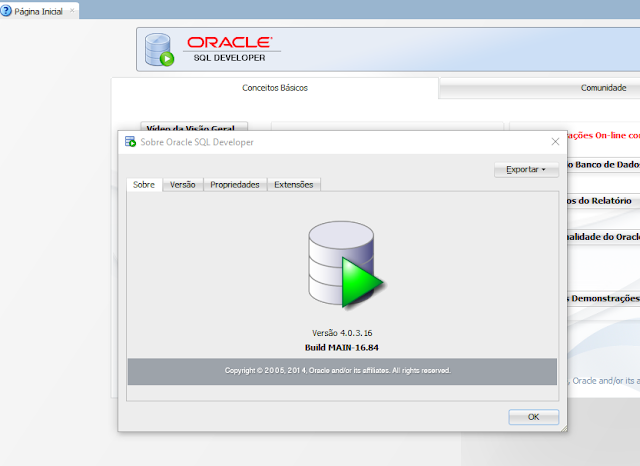
Figura 1 - Sobre a versão que estou usando
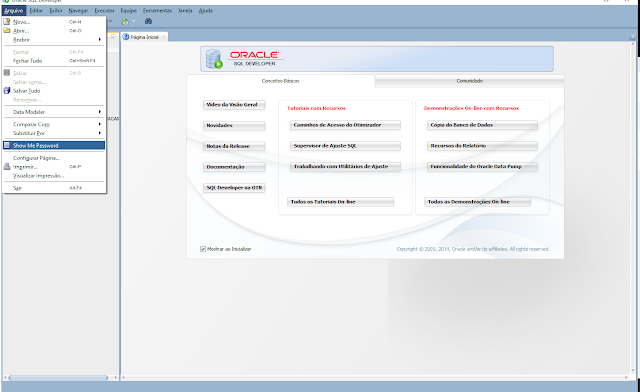
Figura 2 - Olha como fica bonitinho
Oracle SQL Developer versao 4.0.3.16 nessa funciona a que subi aqui pra baixar!...
O site do malucao que fez o brinquedo:
http://show-me-password.tomecode.com/
Vai que eu perco e não consigo achar depois nos favoritos salvos.
Vai que um dia eu perco o link de verdade ou o site do cara some, ou mesmo o projeto lá no github (https://github.com/tomecode/show-me-password-sqldev-jdev) dá um problema, enfim, sempre bom garantir um backup - abaixo site do grande desenvolvedor dessa maravilha!...
----------------------------------------------------------------------------------------------------------------
Show Me password
The "Show me password" is a simple extension for Oracle SQL Developer or Oracle JDeveloper i.e. simple extension (tool) that decrypts all saved (encrypted) password for database connections, application server connection, servers etc. in SQL Developer or JDeveloper.
Extension for Oracle SQL Developer (version: 19.x/18.x/17.x/4.x)
Requirements
- Oracle SQL Developer 4.x/17.x/18.x/19.x or higher
- Java 1.7 (or higher)
Download and Install
- Download the latest version of the extension for Oracle SQL Developer 4.x/17.x/18.x/19.x/23.x/... to your machine. The extension will be packaged as zip file - pls. don't unzip the extension;)
- In SQL Developer, navigate to Help -> Check for Updates... Instead of choosing from the existing update centers, select the "Install From Local File" option, and specify the path to the zip file you downloaded.
- Restart SQL Developer to complete the extension installation
How to use
- If you click on the menu "File" > "Show Password," window will appear displaying table containing the following columns: connection name, database host, SID, username, and the decrypted (saved) password for each database connection stored in SQL Developer.
Note
- If the extension fails to work, you can resolve the issue by removing the "system_cache" folder from the application directory: /SQL Developer/system*/system_cache e.g.: in windows: C:\Users\<user>\AppData\Roaming\SQL Developer\system<versonNumber>\system_cache and restart SQL Developer
- Or just create new issue in github... and I will try to find some time to fix it;)
Extension for Oracle SQL Developer (version: 3.x)
Requirements
Download and Install
- Download the latest version of the extension for Oracle SQL Developer 2.x or 3.x to your machine
- Unzip it and copy JAR file to the $SQL_DEVELOPER_HOME/sqldeveloper/extensions/
- Restart SQL Developer to complete the extension installation
How to use
- If you click on the menu: "File"->"Show password" a window will appear that contains a table (with columns: connection type, connection name, user name and decrypted (saved) password to database) with list of all stored connections in JDeveloper
Extension for Oracle JDeveloper 12c (version: 12.x/...)
Requirements
Download and Install
- Download the latest version (1.0.0) of the extension for Oracle JDeveloper to your machine. The extension will be packaged as a zip file - pls. don't unzip the extension;)
- In JDeveloper, navigate to Help -> Check for Updates... Instead of choosing from the existing update centers, select the "Install From Local File" option, and specify the path to the zip file you downloaded.
- Restart JDeveloper to complete the extension installation
How to use
- If you click on the menu: "File"->"Show password" a window will appear that contains a table (with columns: connection type, connection name, user name and decrypted (saved) password to database) with list of all stored connections in JDeveloper
Extension for Oracle JDeveloper 11g (version: 11.x)
Requirements
Download and Install
- Download the latest version of the extension for Oracle JDeveloper 11.x to your machine
- Unzip downloaded extension and copy it to $JDEVELOPER_HOME_11g/jdeveloper/jdev/extensions/
- Restart JDeveloper to complete the extension installation
How to use
- It's the same as in other versions. :)"